Last updated June 3, 2026
Over one-third of older adults in the U.S. report feeling lonely on a regular basis — and loneliness carries real health consequences, including a 29% higher risk of heart disease and a 32% higher risk of stroke, according to the U.S. Surgeon General’s landmark advisory on social isolation. That’s not a minor inconvenience. That’s a clinical risk factor.
AI companions for seniors are now being marketed as part of the solution. And honestly? Some of them work. But “some of them work” is doing a lot of heavy lifting in that sentence. The market is full of products that overpromise, underdeliver, and collect more of your personal data than they disclose upfront.
This guide on AI Companions for Seniors: How to Choose a Safe, Helpful Digital Friend After 60 walks you through what these tools actually do, what the research says, what the privacy risks are, and how to pick one without getting burned.
No hype. Just plain English.
Key Takeaways
- AI companions can genuinely reduce loneliness — but clinical results range from small to moderate, and they work best when used consistently and supported by family or caregivers.
- Privacy is the biggest risk most people overlook. Know what data is collected, who sees it, and whether it can be sold before you plug anything in.
- The best AI companions supplement human contact — they don’t replace it. Any product claiming otherwise is a red flag.
- Ease of setup matters more than features. A device with 20 features you can’t figure out is worse than one with 5 that work every time.
- Cost and access vary widely. Some programs offer AI companions through state aging agencies or health plans, which adds a layer of vetting and oversight.
What AI Companions for Seniors Actually Do (And What They Don’t)
Let’s start with the basics, because the marketing language around these products is often vague.
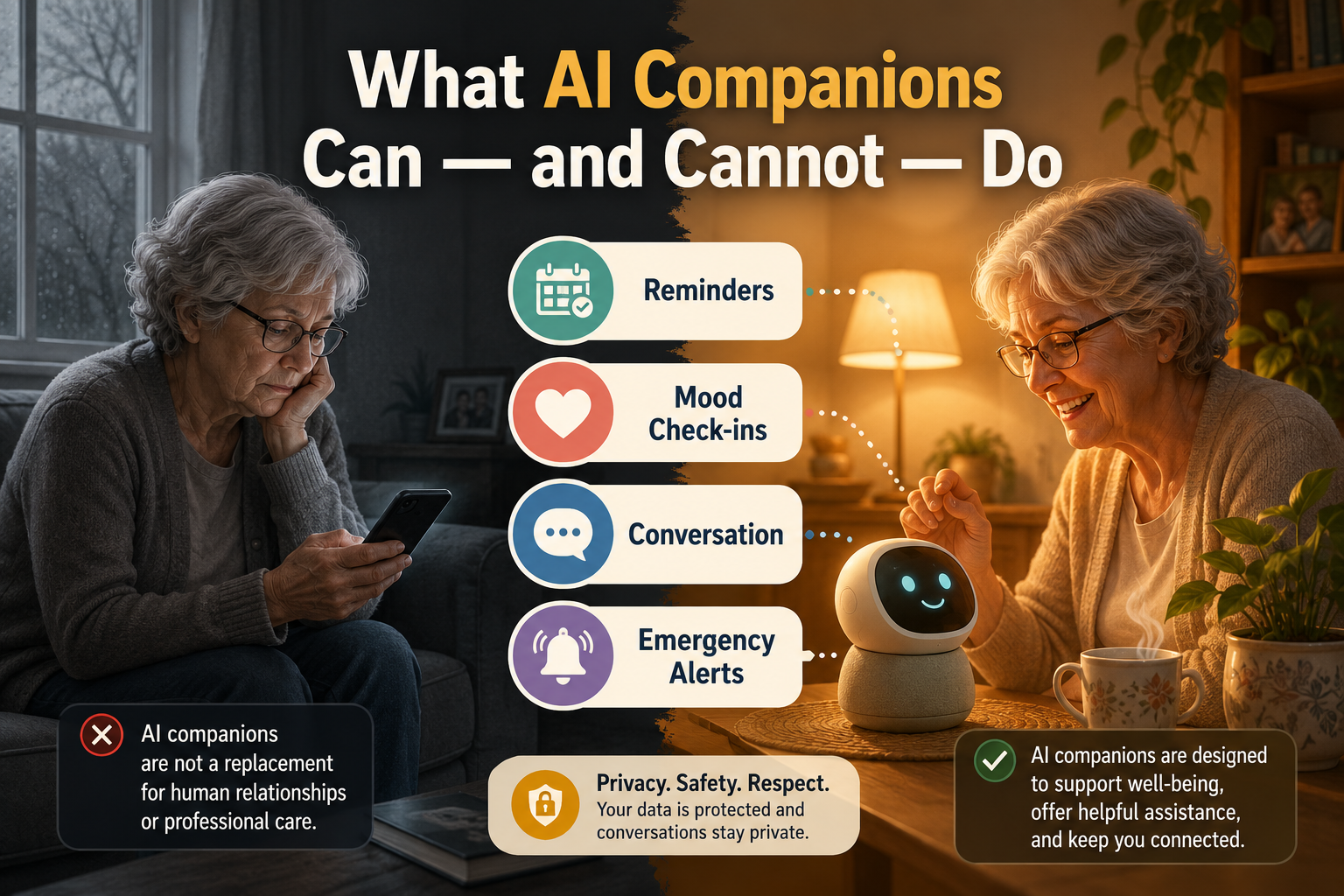
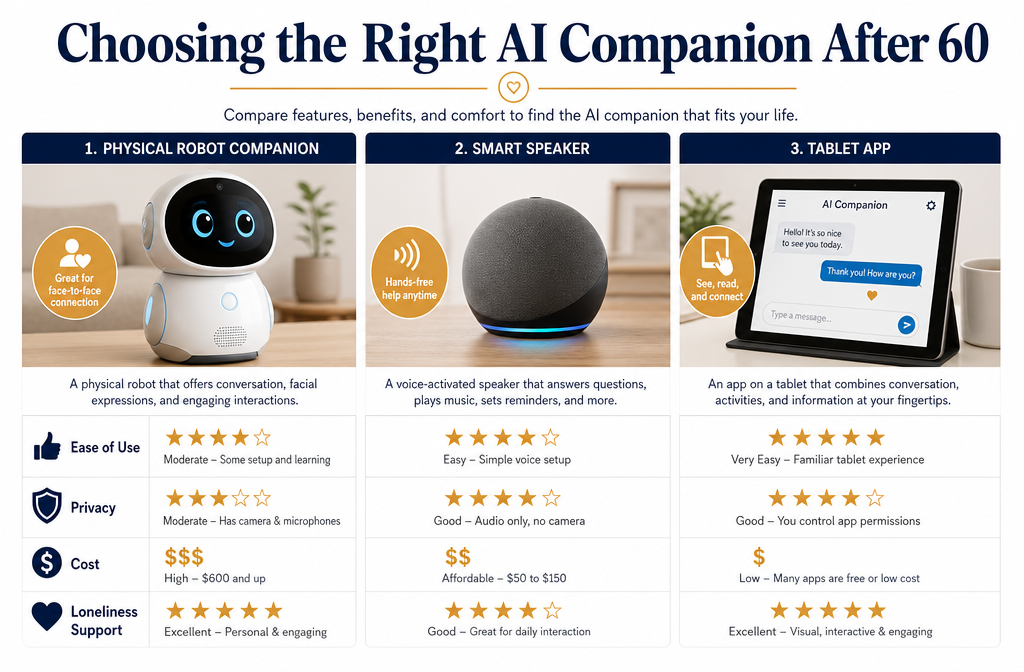
An AI companion is a device, app, or robot that uses artificial intelligence to hold conversations, respond to questions, set reminders, and check in on your mood or health. Some are purely software — apps on a phone or tablet. Others are physical devices with screens or even robotic forms.
Here’s what the better ones actually do well:
- 💬 Conversation — They can talk with you about your day, answer general questions, and respond to what you say in a natural way.
- ⏰ Reminders — Medication times, appointments, hydration prompts.
- 🩺 Wellness check-ins — Daily mood questions, simple health prompts.
- 📞 Video call facilitation — Some devices make it easier to connect with family.
- 🚨 Basic safety alerts — A few can notify a caregiver if you haven’t interacted with the device by a certain time.
Modern AI companions center on conversational engagement, reminders, and mood check-ins specifically to combat loneliness and support mental health at home [1].
Here’s what they don’t do:
- They are not medical devices. They cannot diagnose, treat, or replace a doctor’s advice.
- They are not a substitute for human relationships. The research is consistent on this point.
- They cannot replace emergency services. A companion app is not a medical alert system.
- They don’t understand nuance the way a person does. If you’re in genuine distress, a machine may not catch it.
“The goal is to fill the gaps between human visits — not replace the visits themselves.” — Intuition Robotics CEO, on ElliQ’s design philosophy [6]
That framing matters. If a product is sold as a replacement for human connection, walk away.
The Loneliness Problem Is Real — And So Is the Research
The U.S. Surgeon General’s 2023 advisory — still the primary reference on this topic in 2026 — found that roughly 1 in 2 American adults experience measurable loneliness, with older adults at particular risk. The health consequences are serious: social disconnection is linked to higher rates of dementia, heart disease, stroke, and early death.
So the idea of using technology to address this isn’t frivolous. It’s a legitimate public health response.
What does the clinical evidence actually say?
A 2025 systematic review in Gerontechnology found that social robots and AI companions produced small to moderate improvements in loneliness and depressive symptoms among older adults — particularly when used several times per week and when family or staff were involved in supporting use.
A separate randomized trial of the ElliQ social robot found that older adults living alone who used the device reported improved mood and reduced loneliness scores over three months compared to a control group that only received phone check-ins [6].
ElliQ users typically interact with the device 20 to 30 times per day — medication reminders, wellness check-ins, video calls — and in pilot programs, up to 80% of users reported feeling less lonely after several months [6].
Those are real numbers. But notice the conditions: consistent use, supported by others, over multiple months. This isn’t a plug-it-in-and-feel-better situation.
The honest downside: Results vary significantly by individual. Some people find AI conversation genuinely comforting. Others find it hollow or even unsettling. There’s no way to know until you try — which is why trial periods and return policies matter.
Privacy and Safety: The Part Most Reviews Skip
This is where the conversation about AI Companions for Seniors: How to Choose a Safe, Helpful Digital Friend After 60 gets uncomfortable — and where you need to pay close attention.
AI companions collect data. A lot of it. Voice recordings, daily routines, health check-in responses, mood patterns, location in some cases. The question isn’t whether they collect data. The question is: what happens to it?
The World Health Organization’s 2025 discussion paper on AI for healthy aging makes three specific demands of AI companion products:
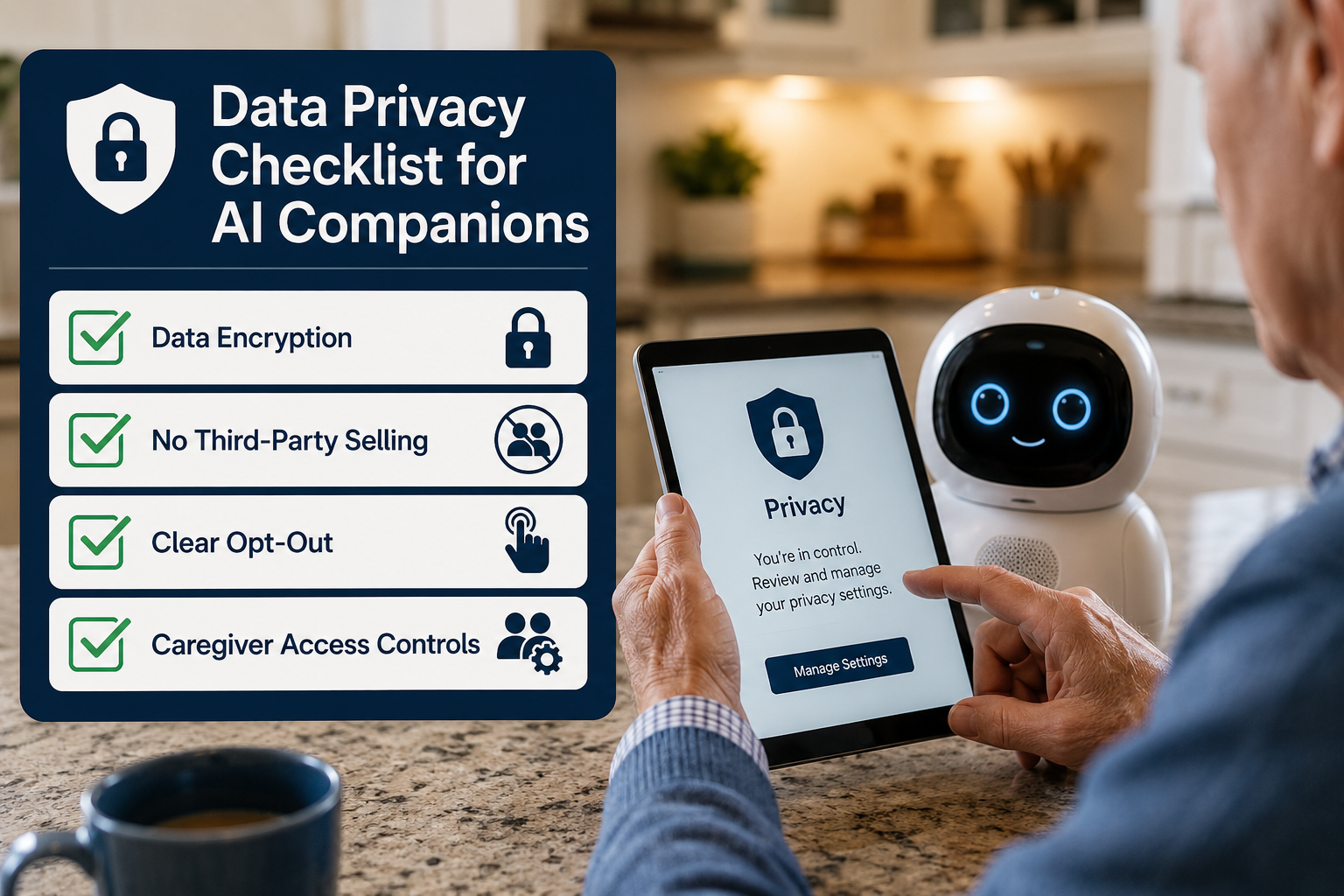
- Transparency — The device must be clearly non-human. You should never be deceived into thinking you’re talking to a person.
- Data protection — Health data must be protected and not used for commercial purposes without explicit consent.
- No unsafe nudging — AI companions must not push you toward commercial products or give health advice without human oversight.
The U.S. National Institute on Aging echoes this: before adopting any AI tool, you should know exactly what data is collected, who can access it, and whether it can be shared with caregivers, insurers, or tech companies.
🔒 Privacy Checklist Before You Buy
Use this before committing to any AI companion:
| Question | What to Look For |
|---|---|
| What data does it collect? | Voice, health data, location — get specifics |
| Where is that data stored? | On-device is safer than cloud-only |
| Can it be sold to third parties? | Must be a clear “no” in the privacy policy |
| Who can access your data? | You should control caregiver access |
| Can you delete your data? | Yes should be a guaranteed option |
| Is the AI clearly identified as non-human? | Required — no exceptions |
What to watch out for: Vague privacy policies written in legal language designed to confuse. If you can’t find a plain-English explanation of what they do with your data, that’s your answer.
How to Choose the Right AI Companion: A Plain-English Evaluation Guide
Not every AI companion is built the same. Here’s how to evaluate your options without getting lost in marketing claims.
Step 1: Match the Tool to Your Actual Need
Be specific about what problem you’re trying to solve.
- Primarily lonely? Look for a device with strong conversational AI and a track record in loneliness research (ElliQ, for example, has published clinical data).
- Need medication reminders? A simpler voice assistant or dedicated reminder app may be enough — and cheaper.
- Family wants a safety check-in? Look for devices with caregiver notification features, not just conversation.
- Want something easy? Prioritize setup simplicity over feature count. Complexity is the enemy of consistent use.
Step 2: Check Who’s Behind It
Products deployed through state aging agencies, health plans, or vetted senior care programs carry an extra layer of oversight [6]. That matters. A startup selling direct-to-consumer with no institutional backing has no accountability structure if something goes wrong.
Ask: Is this product affiliated with any recognized aging services organization? Does it have published research or independent reviews — not just testimonials?
Step 3: Demand a Trial Period
Any reputable company will offer a trial period or return window. If they don’t, that’s a warning sign. You need to test this in your actual home, with your actual routine, before committing.
Step 4: Involve a Family Member or Trusted Friend
Not because you can’t make this decision yourself — you absolutely can. But a second set of eyes on the privacy policy and setup process catches things that are easy to miss when you’re new to a product.
Step 5: Start Simple
The most common mistake is buying the most feature-rich option available. Start with the simplest product that addresses your primary need. You can always upgrade. You can’t un-share data that’s already been collected.
AI Companions for Seniors: How to Choose a Safe, Helpful Digital Friend After 60 — The Bottom Line
Here’s the honest summary.
AI companions can help. The research is real, the loneliness problem is real, and for many older adults — especially those living alone — these tools provide genuine daily support. Reminders get taken. Moods get checked. Conversations happen that wouldn’t otherwise.
But the risks are also real. Privacy policies are often weak. Data collection is often broader than disclosed. And the emotional attachment some people develop to these devices can become a problem if the company shuts down, changes its terms, or pivots its business model.
The tested and approved approach: treat an AI companion as a supplement, not a solution. Use it alongside human connection, not instead of it. Vet the privacy policy before you buy. Start with the simplest option. And if something feels off — about the data practices, the marketing claims, or the way the device behaves — trust that instinct.
No AI companion is worth compromising your privacy or your sense of what’s real.
Conclusion: Practical Next Steps
If you’re seriously considering an AI companion, here’s what to do this week:
- Write down your one main need — conversation, reminders, safety check-ins. Don’t buy for features you won’t use.
- Search for the product’s privacy policy and look for plain-English answers to the checklist above. If you can’t find them, move on.
- Check whether your state’s Area Agency on Aging or your health plan offers vetted AI companion programs. These often come with oversight and sometimes subsidized cost.
- Ask for a trial period before committing to any subscription or purchase.
- Tell someone you trust — a family member, a friend — what you’re trying and why. Their perspective is worth having.
AI companions for seniors are a real and growing category of tools that can genuinely improve daily life. The key is choosing one honestly reviewed, with your privacy protected and your expectations grounded in what the research actually shows — not what the marketing claims.
That’s the bottom line.
References
[1] How Ai Powered Companion Care Is Transforming Senior Support In 2026 – https://allseniors.org/articles/how-ai-powered-companion-care-is-transforming-senior-support-in-2026/
[2] How Ai Powered Companion Care Enhances Senior Support In 2026 – https://allseniors.org/articles/how-ai-powered-companion-care-enhances-senior-support-in-2026/
[4] How Ai Companions Are Changing Daily Life For Seniors In Assisted Living – https://regencyretirementjackson.com/2026/02/28/how-ai-companions-are-changing-daily-life-for-seniors-in-assisted-living/
[6] Ai Companions Are Redefining Elder Care 3 Ways They Fight Loneliness Boost Safety And Scale Support – https://www.forbes.com/sites/cathyrubin/2025/05/16/ai-companions-are-redefining-elder-care-3-ways-they-fight-loneliness-boost-safety-and-scale-support/
[8] Ai Powered Robots Seniors Make Some Uncomfortable Not All – https://www.washingtonpost.com/opinions/2026/04/16/ai-powered-robots-seniors-make-some-uncomfortable-not-all/
[10] Index – https://stories.uh.edu/2026-ai-robots-for-older-adults/index.html